
You have probably felt that specific spike of anxiety leaving the house. Did you lock the front door? Is the oven off? Did you set the alarm?
A smart home kills that doubt. You check your phone. You see the status. You breathe again.
This isn’t just about convenience. It is about peace of mind through connectivity. When your appliances talk to each other, they talk to you.
Зміст
The Rise of the Connected Home
The idea of a fully automated house used to be a luxury for the ultra-wealthy or a sci-fi fantasy. Think of Bill Gates. He spent over $60 million to build a smart estate outside Seattle. His home tracks occupants with electronic chips. Lights follow you. Music follows you. The system even compromises on temperature when two people with different preferences enter the same room.
That was the past.
Today, smart home technology is standard. It is not niche anymore. The market matured quickly. Startups gave way to established tech giants. The driver? The smartphone.
We carry a supercomputer in our pocket that is always online. It makes sense to use that device to control the fridge, the thermostat, the locks, and the lights. This ecosystem is called the Internet of Things (IoT). It connects any electricity-using object in your house to a digital network.
How Smart Home Technology Evolved
To understand where you are, look at where we started. Home automation has a messy history.
In 1975, a Scottish company introduced X10. It was the first major attempt at home automation. X10 used existing electrical wiring to send signals. It turned every plug-in device into a receiver and every remote into a transmitter.
The system worked by sending numerical codes. A command included:
- A start alert
- A unit number for the target device
- The action code (like “on” or “off”)
All this happened in under a second.
It was revolutionary. But it was also flawed.
Electrical lines get noisy. Other devices create interference. An X10 receiver might mistake a power surge for a command to turn on the lights. Or it might miss the signal entirely. The system was unreliable.
Modern Communication Protocols
X10 devices are still sold, but they are legacy tech. Modern systems do not rely on power lines. They use radio waves.
Bluetooth, WiFi, and cellular signals operate on similar principles. They transmit data wirelessly. This removes the “noise” problem of copper wiring. It creates a more stable connection between your controller and your devices.
When you build a smart home, you are choosing these wireless protocols. You are building a web of interconnected products. This web is growing every day.
Preparing for the Hardware
Before you buy sensors, you need a plan. The technology is ready. The infrastructure in your walls is ready. But the gap between them needs bridging.
You will need specific hardware to make this work. You cannot just plug anything into the wall and expect it to integrate. You need devices designed to communicate with the hub or the network.
The next step is selecting the right components. You need to match the protocol to the device. You need to ensure your Wi-Fi network can handle the load. And you need to think about security.
The foundation is laid. Now you have to build on it.

You don’t need a degree in electrical engineering to want a house that anticipates your needs. But before you start tearing down drywall for sensors, you need to know what you’re actually buying. It’s not just about convenience. It’s about control. Or the illusion of it.
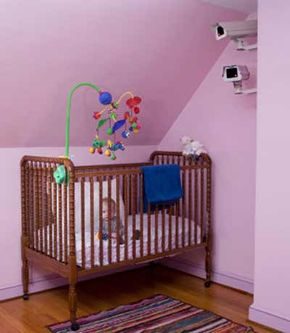
Let’s be clear: smart homes save lives and money if they work. A system that detects a fire and unlocks doors while calling 911 isn’t a luxury. It’s a safeguard. For the elderly living alone, the benefits are tangible. Reminders for medication. Alerts if a fall occurs. Monitoring food intake. Shutting off an oven when memory fails. These aren’t gimmicks. They are critical infrastructure for vulnerable residents.
But for the average homeowner, the appeal is simpler.
Smart homes provide energy efficiency savings. Electric bills drop when lights turn off in empty rooms and climate control adjusts to occupancy. One homeowner reported a heating bill one-third lower than a comparable standard home.
It’s cool, sure. But is it for everyone?
Intelligent Products Galore
The market is flooded. If you have a smartphone, you can control your home. That’s the selling point. The barrier to entry is low, but the cost of entry is rising.
Take the Nest thermostat. It’s WiFi-enabled. It learns your schedule. It adjusts temperature for comfort and efficiency. It tracks energy usage. It reminds you to change filters. It even adapts to your specific heating system, whether it’s a heat pump or radiant floor. The hardware is solid. The software is smart. But it’s just one piece of the puzzle.
Then there is lighting. Philips Hue bulbs are the poster child for ambient automation. You screw them into standard fixtures. You download the app. You can dim, brighten, or change colors. You can create concert-like effects in your living room. You can program up to 50 lights per bridge. It’s fun. It’s flashy. It costs around $200 for a starter pack. That’s three bulbs and a bridge. Not cheap for light bulbs.
Efficiency and Fun (and Frustration)
Belkin’s WeMo switches target the DIY crowd. For about $100, you get a smart switch and a motion detector. You plug a lamp, heater, or coffee pot into the switch. You pair it with your phone. Suddenly, you can turn on a light from 1,000 miles away. Or from your bed.
But here’s the kicker. The most powerful tools in automation are often free.
IFTTT (If This, Then That) is a free internet service. It connects disparate apps and devices. You can set it to post Twitter updates to Facebook automatically. You can schedule text reminders. It works with WeMo. You can set a motion detector in the bedroom to trigger the coffee pot in the kitchen.
The potential is limitless. The setup is tedious.
And this is where the dream starts to crack.
Smart Home Challenges
You buy a thermostat. You buy smart bulbs. You buy a coffee maker that starts itself. You install their apps.
Now you have six apps on your phone.
Most smart home products use proprietary ecosystems. They don’t talk to each other. You are drowning in interfaces. One app for the lights. One for the lock. One for the camera. One for the thermostat. Updating firmware on five different devices is a chore. Controlling them simultaneously is a nightmare.
Enter the hub.
The Revolv hub costs $299. It connects to your WiFi. It attempts to unify all your wireless gear under one interface. It builds pre-programmed capabilities. It’s a single point of control. It works best with Z-Wave, Insteon, and WiFi products. Currently, it’s iPhone-only. Android users are left out in the cold. The company promises expansion. Promises are easy. Compatibility is hard.
Similar consolidation hubs exist from Insteon and SmartThings. They promise a “truly automated home.” One app. One dashboard. Total control.
But here’s the catch.
When the hub goes down, you lose control of everything. When the WiFi drops, you are locked out of your own security. When a server shuts down, your schedule vanishes. You are trading physical keys for digital ones. And digital keys can be hacked. They can fail. They can become obsolete.
The technology is impressive. The savings are real. The safety features are vital.
But if you value reliability over novelty, you might want to think twice before wiring your entire house to the cloud.
What happens when the power goes out?
Does your smart home save you, or does it just leave you in the dark?

If you struggle with your TV remote, do not bother reading this.
A smart home sounds like a logistical nightmare for anyone not comfortable with computers. The biggest mental block isn’t the wiring. It’s the balance. You have to weigh the complexity of the system against its actual usability.
If it’s exasperating, you’ve just made your life harder.
Before you buy anything, ask yourself some hard questions. What components are you actually installing? Are we talking basic light dimmers or imposing alarm systems and video cameras? Who will use it? If it’s just for you, great. If your partner or kids have to operate it daily, is it intuitive enough for them?
“Is the device actually fulfilling a need or is it just a fancy and potentially frustrating toy?”
This matters. If your house is programmed to wake you at 7 a.m., how do you tell it you’re sleeping in on a Saturday or away on business? If the interface is clunky, you’ll stop using it.
Start small. A basic home network is easier to manage than a full-blown automation hub. You can expand later. Smart homes require cash and time. If you’re short on either, keep your “dumb” house.
Check reviews. Avoid products that draw the ire of users. Many make sky-high promises that fall flat. If you use a smartphone, look for a well-reviewed app. Some apps are so unwieldy they cause more headaches than they relieve.
Security is another issue. Hackers who breach your network can turn off alarms and lights. This leaves your home vulnerable. They could also cause mischief. Turning devices on and off rapidly can ruin electronics. In extreme cases, it could cause a fire.
Manufacturers are ramping up production. Smartphones and tablets have made home automation apps accessible. But a full-on Jetsons-style home is still years away.
The problem is the lack of a standard system. There is no universal protocol for all gadgets. Without one, you might spend thousands on products that become obsolete or unusable quickly.
Do you even need this tech? Can’t we just flip a light switch?
Maybe. But the time you save might let you pursue other things. Like developing robot maids.
Smart Home System Costs and Compatibility
How do smart homes work? They use devices like lightbulbs and alarms that connect to a network over Wi-Fi. You control them from anywhere using a phone app.
What smart home devices work with Alexa? Many do. The Amazon Smart Plug is a starter. Philips Hue bulbs work well. So do Ecobee Smart Thermostats and Ring Video Doorbells.
Which is the best smart home app? Samsung SmartThings offers an all-in-one approach. Amazon’s Alexa App is an industry leader. Apple HomeKit and Google Assistant are also popular choices.
How much does a smart home system cost? Full automation of an average four-bedroom, three-bath house can cost up to $15,000. A modest upgrade for a smaller home averages $730.
There is no end to the information available online.